
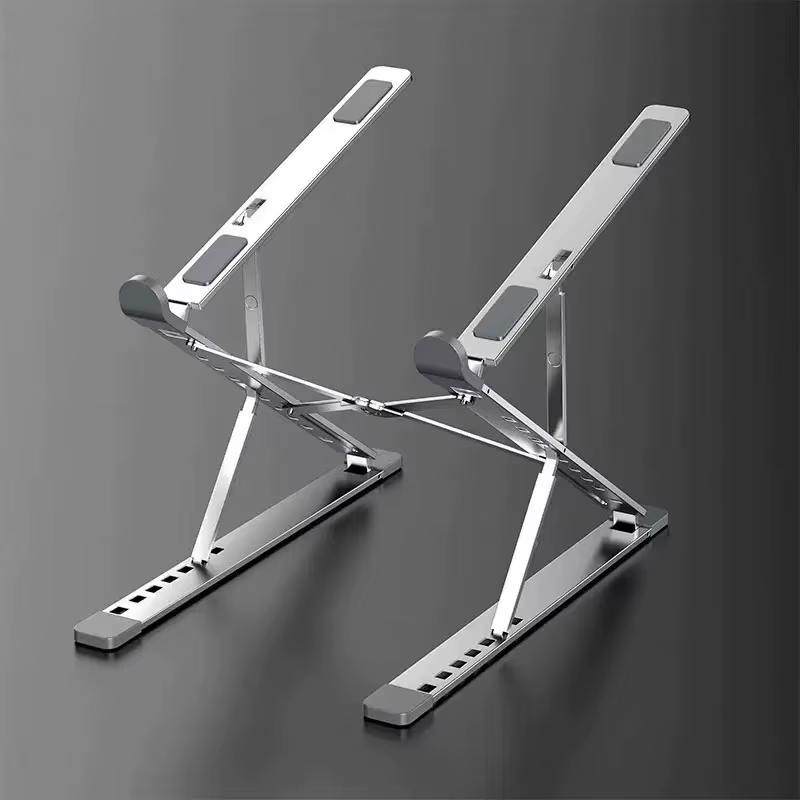
A laptop stand can raise the screen, free desk space and improve airflow, but the best design depends on how you work. A fixed riser is stable for a permanent desk, a foldable stand travels easily, and a rotating stand is useful when sharing a screen during meetings.
Smart Gear Select compared five stand types for Kenyan students, office users and remote workers. We prioritised laptop-size compatibility, stability, adjustment range, portability, material and import practicality.
Quick recommendation
The UGREEN foldable adjustable stand is the best all-round option for most buyers because it balances portability, ventilation and multiple height positions. Choose the Nulaxy C3 for a stable permanent desk, or the UGREEN 360-degree rotating stand for meetings and flexible screen positioning.
Best laptop stands in Kenya: quick comparison
| Laptop stand | Best for | Key strengths | Main caution |
|---|---|---|---|
| UGREEN foldable adjustable stand | Best overall | Portable aluminium design, multiple height positions | Confirm exact LP451/40289 version |
| Nulaxy C3 | Best fixed desk stand | Stable aluminium riser for 10–16-inch laptops | Not ideal for typing directly on the laptop |
| UGREEN 360° rotating stand | Best for meetings | Raised platform, rotation, broad compatibility | Heavier and less travel-friendly |
| Baseus foldable rotating stand | Best premium adjustable option | 360° rotation, multi-joint height adjustment | Higher price and several similar models |
| Portable X-frame stand | Best budget travel option | Very light, folds small, adjustable positions | Less stable with heavy gaming laptops |
Compatibility note: “Supports up to 17.3 inches” does not guarantee stability with every heavy gaming laptop. Check the stand’s width, lip depth, hinge strength and rated load against your device.
1. UGREEN foldable adjustable stand — best overall
UGREEN’s portable adjustable stand supports several height positions and folds flat for storage or travel. Official versions in this family are designed for laptops and tablets from roughly 8 to 17.3 inches, with an open structure for airflow.
Why it may suit Kenyan buyers: It suits students and hybrid workers who need one stand for home, school and travel. The aluminium frame is more durable than very thin plastic stands while remaining easier to carry than a large desktop riser.
Important limitation: UGREEN uses several similar model numbers, including regional variations. Confirm the exact model, supported size, weight limit and number of adjustment positions before linking it.
2. Nulaxy C3 — best fixed desk stand
The Nulaxy C3 is a fixed aluminium riser for laptops around 10 to 16 inches. It raises the screen by approximately seven inches, uses an open-back design for ventilation and can be disassembled into three pieces.
Why it may suit Kenyan buyers: It is best for a permanent home or office workstation with an external keyboard and mouse. The fixed structure has fewer moving hinges than an adjustable stand and can feel more stable over time.
Important limitation: Nulaxy itself recommends an external keyboard and mouse because typing directly on the elevated laptop can introduce wobble and poor wrist positioning. It is less convenient for frequent travel.
3. UGREEN 360-degree rotating stand — best for meetings
UGREEN’s rotating desktop riser is designed for laptops up to about 17.3 inches and combines height adjustment with a rotating base. The raised platform can bring the screen closer to eye level and turn easily when showing work to another person.
Why it may suit Kenyan buyers: It is useful in shared offices, reception desks, client meetings and content-creation setups where screen angle changes frequently.
Important limitation: A rotating riser is larger and heavier than a travel stand. Check hinge resistance and desk depth, especially with a heavy 16- or 17-inch laptop.
4. Baseus foldable rotating stand — best premium adjustable option
Baseus offers a multi-joint aluminium stand with 360-degree rotation and adjustable height. The official regional listing describes support up to 8kg, a three-joint structure and a maximum height around 31cm.
Why it may suit Kenyan buyers: It is suitable for buyers who want a more flexible sit-stand-style arrangement for a laptop or tablet and value a finished desktop appearance.
Important limitation: Baseus has several stands with similar names. Confirm the SKU, maximum load, folded dimensions and whether the seller includes the same multi-joint version shown in the images.
5. Portable X-frame laptop stand — best budget travel option
An X-frame stand uses a simple folding structure with several angle positions. It is inexpensive, very light and easy to keep in a backpack. The raised gaps can improve airflow compared with placing the laptop flat on a desk.
Why it may suit Kenyan buyers: It is the most practical low-cost option for students, libraries and occasional remote work where portability matters more than premium materials.
Important limitation: Thin plastic or lightweight aluminium versions can flex, slide or tip with large gaming laptops. Check the anti-slip pads, front retaining hooks and maximum supported width.
How to choose the right laptop stand
Match the stand to your laptop’s size and weight
Measure the laptop width and check its weight. A stand that technically fits a 17-inch screen may still be unstable if the laptop is thick, rear-heavy or built for gaming. The front hooks should hold the base without touching your wrists.
Use an external keyboard for higher stands
A stand improves screen height only when the keyboard and mouse remain at a comfortable level. Typing directly on a highly elevated laptop can raise the shoulders and bend the wrists. A separate keyboard and mouse create a more complete ergonomic workstation.
Fixed, foldable or rotating?
Fixed stands are simple and stable. Foldable stands balance portability and adjustment. Rotating stands are useful for meetings and shared screens but are usually heavier. Vertical stands save space when a closed laptop is connected to an external monitor, but they are not designed for active typing.
Airflow helps, but a stand is not a cooling system
An open stand can reduce blocked vents and improve natural airflow. It will not repair a clogged fan, dried thermal compound or an overheating laptop. Keep vents clean and avoid soft surfaces that block intake openings.
AliExpress buying checklist for laptop stands
- Check the exact model and material, not only the promotional photograph.
- Confirm the supported laptop width and rated load.
- Review recent photos for hinge looseness, sharp edges and missing rubber pads.
- Compare final shipping cost because heavy aluminium stands can lose their price advantage.
- Prefer sellers showing folded dimensions and package weight.
- For rotating models, check whether the base rotates smoothly without wobbling.
Complete your workstation with our guide to the best USB-C hubs for laptops in Kenya and browse more advice in the laptops section.
How we selected these products: Smart Gear Select compared official specifications, supported laptop sizes, materials, adjustment mechanisms, local-market availability and import practicality. We did not physically test every stand, so exact stability and hinge quality must be verified through the selected seller and recent buyer feedback.
Frequently asked questions
Is a laptop stand worth buying?
It can be worthwhile when it raises the screen, improves desk organisation and keeps vents clear. The greatest ergonomic benefit usually comes when it is paired with an external keyboard and mouse.
Can a laptop stand damage a laptop?
A correctly sized stand with rubber contact pads should not damage the laptop. Poorly finished metal edges, weak hooks or an unstable hinge can create risk, so inspect the stand before use.
Do laptop stands improve cooling?
They can improve airflow when the laptop’s vents are otherwise obstructed, but they do not actively cool the processor unless fans are included. Cooling pads add fans but can also add noise and dust.
Which stand is best for students?
A foldable adjustable or X-frame stand is usually easiest to carry. Students with a permanent desk may prefer a sturdier aluminium riser.
Final recommendation
Choose the UGREEN foldable stand for the best balance of portability and stability, the Nulaxy C3 for a fixed desk, a UGREEN rotating riser for meetings, the Baseus multi-joint stand for premium adjustment, or a portable X-frame for the lowest-cost travel setup.