
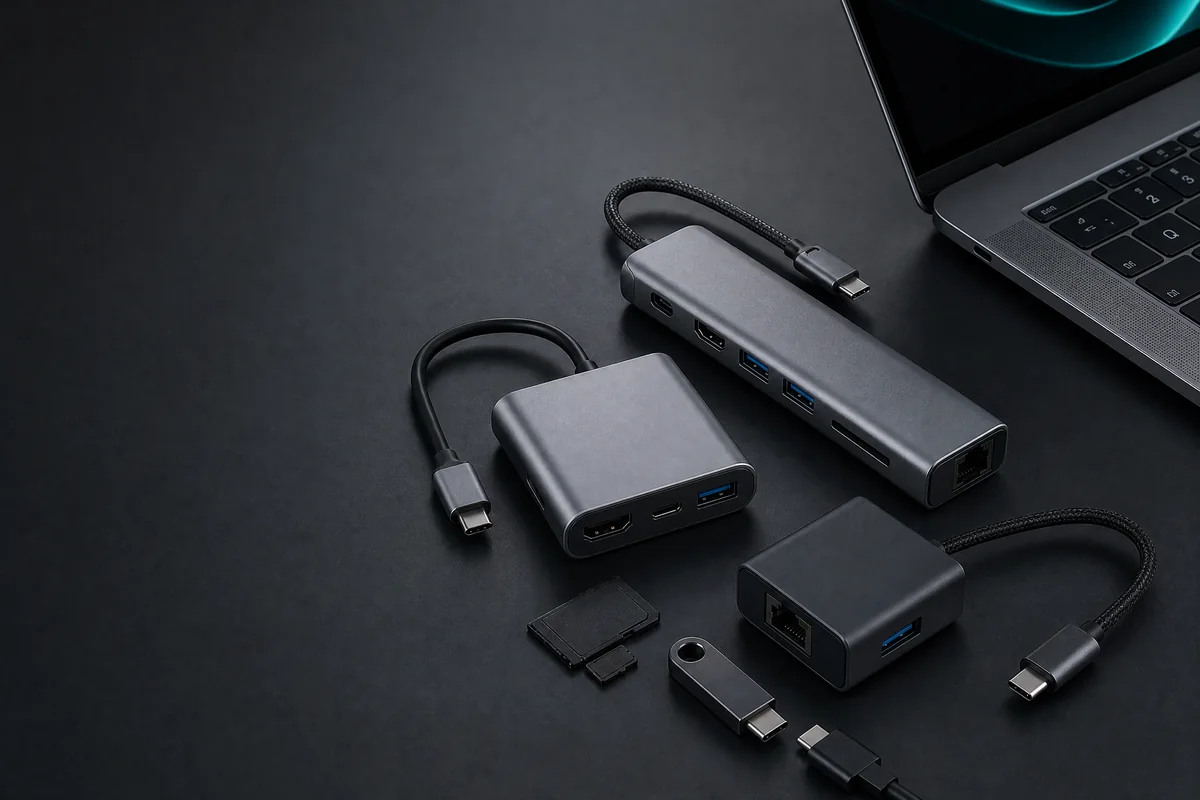
A good USB-C hub can turn one laptop port into a more useful workstation with HDMI, extra USB ports, Ethernet, memory-card access or pass-through charging. The difficulty is that many hubs look almost identical while offering very different speeds, display support and port combinations.
For this research-based guide, Smart Gear Select researched AliExpress listings available to Kenyan buyers and selected five options for distinct needs: overall value, presentations, a full desk setup, a low-cost portable setup and high-speed file transfer. We prioritised useful port combinations, practical import size, clear specifications, seller information and relative value.
Quick recommendation
The Essager 5-in-1 USB-C Hub is our best overall value pick for most buyers who want a compact everyday hub. Choose the 10-in-1 USB-C Hub if Ethernet, card readers and a wider port selection matter more than portability. For projectors and older office displays, the UGREEN HDMI/VGA hub is the most practical specialist option.
Best USB-C hubs in Kenya: quick comparison
| USB-C hub | Best for | Key connections | Main caution |
|---|---|---|---|
| Essager 5-in-1 USB-C Hub | Best overall value | HDMI and multiport expansion | Confirm the exact five-port variant |
| UGREEN USB-C HDMI/VGA Hub | Presentations and older monitors | HDMI, VGA and USB expansion | Check simultaneous display support |
| 10-in-1 USB-C Hub | Full desk and remote-work setups | HDMI, PD, Ethernet, USB and SD/TF | Generic model; verify seller and variant carefully |
| 3-in-1 USB-C Hub | Budget and travel use | HDMI, USB and PD input | Lowest advertised price may be for another variant |
| A63M Gen 2 USB Hub | Creators and file transfers | USB-A, two USB-C ports and SD/TF | Not intended as an HDMI docking station |
Price note: The AliExpress export was checked for Kenya/KES on July 29, 2026. Prices can change by product variation, coupon, account status, shipping method and applicable charges. For accuracy, this guide uses live “Check current price” buttons rather than fixed public prices.
1. Essager 5-in-1 USB-C Hub — best overall value
The Essager 5-in-1 is the most balanced choice for a buyer who wants useful laptop expansion without carrying a large docking station. Its compact format makes it suitable for students, office workers and travellers who need an external display connection plus extra ports for everyday accessories.
Why it stands out: It provides a more practical middle ground than a basic USB splitter while remaining considerably smaller and less expensive than a large desktop dock. Essager is also more recognisable than many completely unbranded marketplace options.
Best for: General laptop use, presentations, a keyboard and mouse setup, and buyers who want one portable adapter for several tasks.
Important limitation: The listing may contain several port configurations under one product page. Confirm that the selected variation is the complete five-in-one model shown in the article image. Also check the stated HDMI resolution, USB data speed and whether the USB-C port is for charging input or data.
Check Essager Price on AliExpress
2. UGREEN USB-C HDMI/VGA Hub — best for presentations
The UGREEN HDMI/VGA hub is the specialist option in this list. HDMI is common on newer monitors and televisions, while VGA remains useful in schools, meeting rooms and offices that still use older projectors or displays.
Why it stands out: UGREEN has a clearer accessory-brand identity than most generic marketplace hubs. The combination of HDMI and VGA can be valuable for people who regularly move between modern and legacy display equipment.
Best for: Teachers, trainers, office presentations, conference rooms and users who frequently connect to different display types.
Important limitation: Do not assume that HDMI and VGA can always show two independent displays simultaneously. Verify the selected listing’s display behaviour and maximum resolution. Your laptop’s USB-C port must also support video output.
Check UGREEN Price on AliExpress
3. 10-in-1 USB-C Hub with Ethernet — best full docking station
This 10-in-1 hub is designed for a more permanent workstation. The selected variation combines display output, pass-through charging, wired networking, USB expansion and memory-card access, reducing the number of separate adapters needed on a desk.
Why it stands out: Gigabit Ethernet is useful where Wi-Fi is unstable or where a dependable wired connection is preferred for video calls, large downloads and office work. SD and TF/microSD slots are also useful for photographers and creators.
Best for: Remote workers, creators, home offices and laptop users building a full monitor-and-accessories setup.
Important limitation: This is a generic model rather than a strongly established brand. Seller quality, recent buyer feedback and the exact selected variation therefore matter more. A “100W PD” label generally describes the maximum charging input supported by the hub, not a promise that the laptop receives the full 100W or that a charger is included.
Check 10-in-1 Hub Price on AliExpress
4. 3-in-1 USB-C Hub with HDMI and PD — best budget option
The 3-in-1 model is for buyers who need only the essentials: an HDMI connection, one USB connection and a Power Delivery input. It is smaller, easier to carry and generally less expensive than the multiport hubs in this guide.
Why it stands out: The simple port layout reduces unnecessary cost for a buyer who does not need Ethernet, card readers or several USB accessories. It is also a practical backup adapter for travel or presentations.
Best for: Budget buyers, occasional external-display use, travel and light laptop setups.
Important limitation: AliExpress pages often advertise the price of the cheapest variation. Select the complete HDMI + USB + PD hub rather than a cable, connector or lower-spec variant. This model should not be treated as a replacement for a full desktop dock.
Check Budget Hub Price on AliExpress
5. A63M Gen 2 USB Hub with SD/TF — best for file transfers
The A63M serves a different purpose from the HDMI-focused products above. It is primarily a data-expansion hub, with USB-A, two USB-C connections and SD/TF memory-card access listed for the selected model.
Why it stands out: It is better suited to moving files between flash drives, external storage, cameras and memory cards than to building a display-centred workstation. That makes it useful for photographers, creators and users whose laptops have too few data ports.
Best for: SD and microSD users, creators, file transfers and laptops that need additional USB-A and USB-C data connections.
Important limitation: This is not the right choice when HDMI, Ethernet or laptop charging is the priority. Confirm whether each USB-C port supports data, power or both; connector shape alone does not define the port’s capabilities.
Check A63M Price on AliExpress
How we selected these USB-C hubs
Arif Bukera, Founder & Tech Lead at Smart Gear Select, evaluated the exported product pool using the following research factors:
- Kenya availability: The product needed to be available through the Kenya/KES/English AliExpress view at the time of checking.
- Useful Each selection needed to solve a distinct buyer need rather than repeat the same port layout.
- Port clarity: The listing needed to identify its main connections and selected variation clearly enough for comparison.
- Import practicality: Small, non-battery accessories are generally easier to ship than large or battery-powered electronics.
- Seller and feedback checks: Sales activity, recent feedback, listing consistency and seller information were considered before shortlisting.
- Relative value: We compared the useful functions offered against the product’s current price range and limitations.
USB-C compatibility: what to check before buying
A USB-C connector does not guarantee that a laptop supports every USB-C feature. Two ports that look identical can support different combinations of data, charging and display output.
1. Check whether your laptop supports video output
For HDMI or VGA through a hub, the laptop normally needs DisplayPort Alternate Mode, Thunderbolt or compatible USB4 video support. A data-only USB-C port may recognise USB accessories but fail to send a picture to a monitor.
2. Check the charging claim carefully
“100W PD” usually means the hub can accept up to a stated Power Delivery input under supported conditions. The hub itself consumes some power, the laptop negotiates what it can receive, and the charger and cable must also support the required wattage. A compatible charger is not always included.
3. Match the USB speed to your devices
USB 2.0 is sufficient for a keyboard, mouse or printer, but it is slow for large file transfers. For external SSDs and frequent media transfers, look for clearly specified 5Gbps or faster data ports and use compatible cables and storage devices.
4. Confirm the exact variation
AliExpress sellers frequently combine several versions under one product page. A displayed price may apply to a basic adapter while the product title describes the highest-spec option. Before paying, confirm the selected image, port layout, model name, shipping charge and full checkout total.
Which USB-C hub should you buy?
- Choose the Essager 5-in-1 for a balanced, portable everyday hub.
- Choose the UGREEN HDMI/VGA hub for presentations and older projectors.
- Choose the 10-in-1 hub for Ethernet, memory cards and a full home-office setup.
- Choose the 3-in-1 hub when price and portability matter more than extra ports.
- Choose the A63M when file transfer and memory-card access are more important than display output.
Buying a USB-C hub from AliExpress in Kenya
AliExpress can offer competitive pricing and a wider selection than many local stores, but the best choice is not always the cheapest listing. Use these checks before ordering:
- Set the destination to Kenya and currency to KES.
- Select the exact product variation shown in this guide.
- Read recent reviews for the same variation, not only the overall listing.
- Check the seller’s feedback, completed orders and listing history.
- Confirm shipping cost, estimated delivery and the final checkout total.
- Keep screenshots of the selected variation and specifications until delivery.
- Test HDMI, USB data, charging and card readers soon after receiving the hub.
For more laptop buying advice, visit the Smart Gear Select laptops hub.
Frequently asked questions
Will every USB-C hub work with every laptop?
No. Basic USB data may work while HDMI or pass-through charging does not. Check the laptop manufacturer’s specification for DisplayPort Alternate Mode, Thunderbolt, USB4 and Power Delivery support.
Can a USB-C hub damage a laptop?
A correctly designed hub used with compatible equipment should not normally damage a laptop. Risk is higher with poor-quality power circuitry, unsuitable chargers, damaged cables or misleading specifications. Use a reputable charger and stop using any hub that overheats excessively, disconnects repeatedly or smells burnt.
Does a 100W USB-C hub include a 100W charger?
Usually not. “100W PD” commonly describes supported charging input or pass-through capacity. Check the package contents and use a charger and cable rated for the power your laptop requires.
Why does HDMI not work through my USB-C hub?
The most common reason is that the laptop’s USB-C port does not support video output. Other causes include an incorrect hub variation, an incompatible cable, display settings, driver issues or a resolution and refresh-rate combination the hardware cannot support.
Is a USB-C hub the same as a docking station?
The terms overlap, but a hub is usually smaller and designed for portable port expansion. A docking station often provides more ports, stronger display support, a dedicated power supply or features intended for a permanent desk setup.
Is it better to buy locally or import from AliExpress?
Local purchasing can offer faster delivery, easier returns and clearer warranty support. AliExpress may offer better variety or pricing. Compare the complete delivered cost, seller reliability, return practicality and how urgently you need the product.
Final verdict
The best USB-C hub is the one that matches your laptop’s capabilities and the ports you genuinely need. For most buyers, the Essager 5-in-1 provides the strongest balance of portability and everyday usefulness. The 10-in-1 model is the better workstation choice, while the UGREEN HDMI/VGA hub is especially useful for presentations involving mixed display equipment.
Do not buy on price alone. Confirm the exact variation, laptop compatibility, shipping cost and seller information before ordering. That final check is more important than a long list of advertised features.
About the author
Arif Bukera is the Founder & Tech Lead at Smart Gear Select. He leads research-based technology comparisons and buying guides focused on specifications, value, compatibility, market availability and practical buyer risks. Smart Gear Select clearly distinguishes comparative research from documented hands-on testing.