
Affiliate Disclosure: SmartGearSelect.com participates in the Amazon Services LLC Associates Program and the AliExpress Affiliate Program. As an Amazon Associate and AliExpress affiliate, we may earn commissions from qualifying purchases. This does not increase your price or influence our editorial recommendations.
📌 The Bottom Line
The Keychron Q2 Max is a premium 65% mechanical keyboard built for enthusiasts, developers, gamers, and anyone who values a solid typing experience. Its CNC-machined aluminum body, double-gasket construction, hot-swappable switches, programmable keys, and three connection modes make it one of the most complete compact keyboards in Keychron’s lineup.
Unlike the older Q2 Pro, the Q2 Max adds a low-latency 2.4 GHz wireless connection with a 1000 Hz polling rate. That makes it much better suited to gaming while retaining Bluetooth multi-device support for everyday productivity.
It is heavy, expensive compared with plastic keyboards, and not particularly portable. However, buyers looking for premium materials, extensive customization, and satisfying acoustics will find very little to complain about.
Key Specifications
| Layout | 65%, approximately 68 keys |
|---|---|
| Case | CNC-machined 6063 aluminum |
| Connectivity | 2.4 GHz wireless, Bluetooth 5.1 and USB-C |
| Polling Rate | 1000 Hz over 2.4 GHz and USB-C; 90 Hz over Bluetooth |
| Switches | Hot-swappable Gateron Jupiter mechanical switches on assembled models |
| Keycaps | KSA-profile double-shot PBT |
| Battery | 4000 mAh rechargeable battery |
| Compatibility | Windows, macOS and Linux |
| Weight | Approximately 1.53 kg or 3.37 lb |
Premium Aluminum Construction
The first thing you will notice about the Keychron Q2 Max is its weight. At approximately 1.53 kg, it feels more like a piece of professional desktop equipment than an ordinary computer keyboard.
The entire case is manufactured from 6063 aluminum using CNC machining, polishing, sandblasting and other finishing processes. The result is a rigid chassis that stays firmly planted on the desk and shows virtually none of the flex commonly found in inexpensive plastic keyboards.
This substantial construction gives the Q2 Max an unmistakably premium feel, but it also makes the keyboard impractical for frequent travel. It is best treated as a permanent part of a home office, workstation or gaming setup.
Typing Feel and Acoustics
Keychron uses a double-gasket mounting system that separates the plate from the metal case and places silicone pads between the upper and lower sections. This helps reduce harsh metal resonance while allowing a small amount of controlled movement during typing.
The keyboard also contains multiple layers of acoustic material, including IXPE, PET and latex foam. These layers help reduce unwanted hollowness, case ping and sharp impact noise.
The resulting sound is deeper and more controlled than what you normally hear from a mass-market mechanical keyboard. Switch choice, desk material and typing technique will still affect the final sound, but the Q2 Max provides an excellent factory foundation without requiring immediate modification.
A flexible polycarbonate plate contributes to a softer typing feel than a rigid steel plate, while PCB-mounted screw-in stabilizers help larger keys such as the spacebar, Enter and Shift feel more secure.
Compact 65% Layout
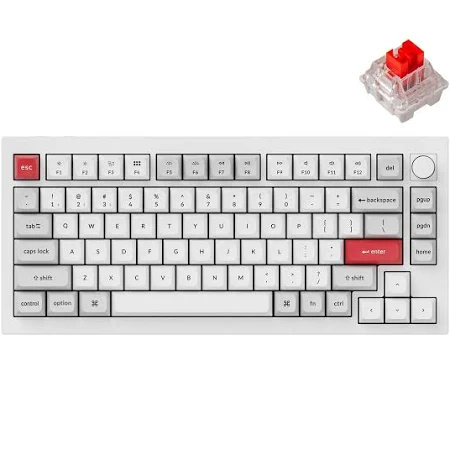
The Q2 Max uses a 65% layout, retaining dedicated arrow keys and several navigation controls while removing the number pad and function-key row. This gives you more room for mouse movement without reducing the keyboard to the extremely minimal layout of a 60% board.
It is a practical size for gaming, writing, programming and general office use. However, people who regularly use a number pad, dedicated function keys or extensive spreadsheet shortcuts may be more comfortable with a larger keyboard.
Three Connection Options
The Q2 Max can connect through 2.4 GHz wireless, Bluetooth 5.1 or a wired USB-C connection.
The included 2.4 GHz receiver supports a polling rate of up to 1000 Hz, making it the preferred wireless mode for gaming and other latency-sensitive tasks. The USB-C connection also supports a 1000 Hz polling rate while charging the keyboard.
Bluetooth runs at a lower 90 Hz polling rate but allows the keyboard to pair with as many as three devices. You can move between a desktop computer, laptop, tablet or phone using keyboard shortcuts rather than repeatedly pairing the keyboard.
This combination gives the Q2 Max considerably more flexibility than Bluetooth-only enthusiast keyboards. You can use Bluetooth for convenient multi-device productivity, 2.4 GHz for wireless gaming and USB-C whenever you need maximum reliability or charging.
Battery Life
The keyboard contains a 4000 mAh rechargeable battery. Keychron rates it for up to 180 hours with the backlighting turned off or up to 100 hours with RGB lighting operating at its lowest brightness.
Actual battery life will depend on connection mode, RGB brightness, usage patterns and idle-time settings. Even so, the large battery should allow most users to work for several days or weeks between charges.
Hot-Swappable Switches
The hot-swappable PCB lets you replace compatible mechanical switches without soldering. This makes it possible to change the keyboard’s sound and feel without replacing the entire board.
You might choose linear switches for smooth gaming, tactile switches for more typing feedback or clicky switches for an audible response. The hot-swap system also makes replacing an individual damaged switch far easier than repairing a soldered keyboard.
Fully assembled versions generally include Gateron Jupiter switches, with available options varying by seller and configuration. Buyers should confirm the switch type listed on the product page before ordering.
QMK and Keychron Launcher Customization
The Q2 Max supports open-source QMK firmware and can be configured through Keychron Launcher. You can remap keys, create macros, adjust shortcuts and customize different keyboard layers.
This is particularly useful on a compact keyboard because rarely used keys can be placed on secondary layers instead of being removed completely. Developers can create coding shortcuts, content creators can assign editing commands, and gamers can configure controls for specific games.
Customization may initially feel complicated to beginners, but the keyboard works normally without advanced configuration. You can learn the additional features gradually rather than setting everything up immediately.
Mac, Windows and Linux Compatibility
The Q2 Max is designed for both macOS and Windows and includes a physical system switch for changing operating modes. Fully assembled versions also include alternative keycaps for the two operating systems.
Linux users can use the keyboard as well, although some advanced configuration features may require additional setup. The ability to save separate layouts makes the keyboard especially convenient for people who move between personal and work computers running different operating systems.
RGB Lighting and Keycaps
South-facing RGB lighting helps prevent interference with popular Cherry-profile aftermarket keycaps. The lighting can be adjusted or disabled when you prefer a cleaner desktop appearance or want to extend battery life.
Fully assembled versions include KSA-profile double-shot PBT keycaps. PBT is generally more resistant to shine and surface wear than basic ABS plastic, although the tall, sculpted KSA shape may require some adjustment for users accustomed to lower-profile laptop keyboards.
The included keycaps are not designed to shine through, so RGB lighting appears mainly around and beneath the keys rather than illuminating the legends.
Who Should Buy the Keychron Q2 Max?
The Keychron Q2 Max is particularly well suited to:
- Mechanical-keyboard enthusiasts who want a premium prebuilt foundation.
- Gamers who need low-latency 2.4 GHz wireless performance.
- Developers and writers who spend many hours typing.
- Mac and Windows users who regularly move between operating systems.
- Buyers who want to experiment with switches, keycaps and custom layouts.
It may not be the right choice for frequent travelers, buyers working with a limited budget or people who require a dedicated number pad and function-key row.
⚖️ Pros and Cons
| Pros | Cons |
|---|---|
| Premium CNC-machined aluminum construction | Heavy and unsuitable for frequent travel |
| Low-latency 2.4 GHz wireless connection | More expensive than plastic mechanical keyboards |
| Bluetooth pairing for up to three devices | 65% layout omits the number pad and function row |
| Hot-swappable mechanical switches | Tall KSA keycaps may require an adjustment period |
| Excellent factory sound treatment | QMK customization can initially confuse beginners |
| QMK and Keychron Launcher programmability | Keycap legends are not shine-through |
| Strong macOS, Windows and Linux compatibility | No dedicated USB passthrough port |
🎯 Final Verdict
The Keychron Q2 Max successfully combines the build quality of a custom mechanical keyboard with the convenience expected from a modern wireless model.
Its aluminum construction, acoustic foam, double-gasket mounting system and hot-swappable switches provide an excellent foundation for typing and customization. More importantly, the addition of 2.4 GHz wireless fixes one of the main limitations of the earlier Q2 Pro by providing a faster wireless option for gaming.
The Q2 Max is not a budget keyboard, and its substantial weight means it belongs on a desk rather than in a backpack. Nevertheless, its materials, connection options and customization potential make it a strong long-term purchase for anyone ready to move beyond an entry-level mechanical keyboard.
For a productivity-focused mouse to complete your desktop setup, read our Logitech MX Master 3S Review.
🛒 Where to Buy
🛒 Check the Keychron Q2 Max Price on Amazon →
Prices and availability may change. Confirm the selected color, switch type and keyboard configuration before completing your purchase.
🔗 Related Reviews
- Logitech MX Master 3S Review – The Productivity Legend
- Anker 737 Power Bank Review – The Digital Energy Hub
👨💻 About the Author
Arif Bukera is Tech Lead at Smart Gear Select, where he oversees consumer-technology research, editorial strategy and buying-guide development.
This review was prepared using official specifications, available product documentation, expert analysis and real-user feedback. Our recommendations are independently researched and are not controlled by manufacturers, retailers or affiliate partners.
Arif has covered consumer technology for more than eight years, focusing on practical guidance that helps readers choose products suited to their needs and budgets.
📧 Contact: info@smartgearselect.com
“We research so you don’t have to.”